Forgotten free trials, recurring app memberships, and hidden automatic debit payments cost the average consumer hundreds of dollars every year. Whether it is a streaming service you no longer watch, a fitness app you stopped using, or an accidental free trial sign-up, unwanted subscription charges can quietly drain your bank account.
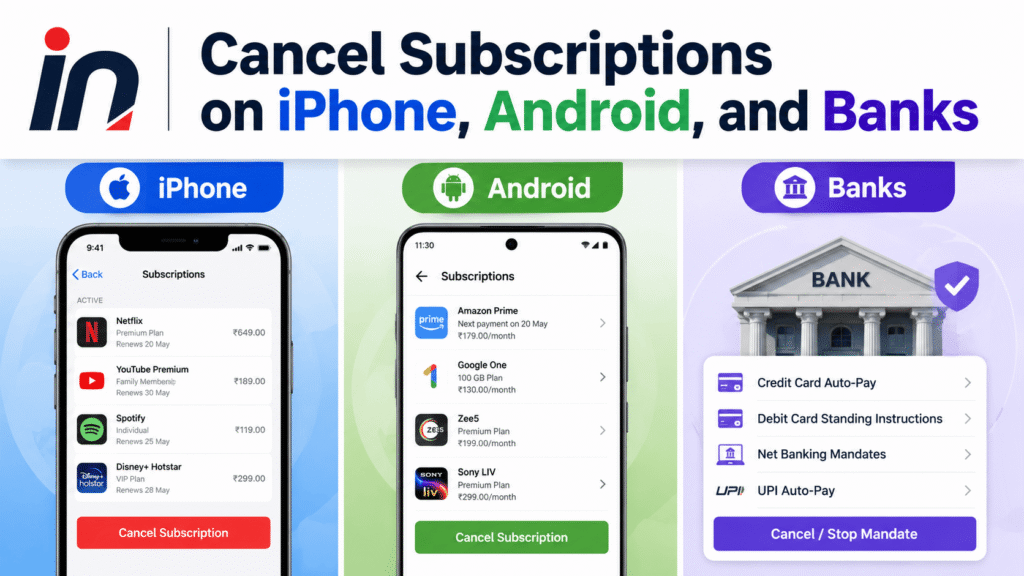
Worse yet, simply deleting an app from your home screen does not cancel your active subscription. Apple, Google, and third-party merchants will continue to bill your linked credit card or bank account until you formally revoke payment authorization.
In this comprehensive guide, we will walk you through how to cancel subscriptions on iPhone, Android, bank accounts, and digital wallets to stop unwanted recurring charges permanently.
Method 1: How to Cancel Subscriptions on iPhone and iPad
If you subscribed to an app through the Apple App Store or initiated a free trial using your Apple ID, Apple manages the billing. You must cancel the subscription through your iOS Settings rather than inside the third-party app.
Step-by-Step Instructions:
- Open the Settings app on your iPhone or iPad.
- Tap your Name / Apple ID banner at the very top of the screen.
- Tap Subscriptions. (If you don’t see Subscriptions, tap Media & Purchases > View Account > Subscriptions).
- Scroll through the list of active subscriptions and tap the specific app or service you wish to cancel.
- Tap Cancel Subscription (or Cancel Free Trial).
- Tap Confirm when prompted.
Important Note: After canceling, you will still retain access to the premium features until the end of your current billing cycle. For free trials, Apple recommends canceling at least 24 hours before the trial ends to avoid an automatic charge.
Method 2: How to Cancel Subscriptions on Android Devices
Android subscriptions purchased through the Google Play Store are linked directly to your Google Account.
Step-by-Step Instructions:
- Open the Google Play Store app on your Android phone or tablet.
- Tap your Profile Icon in the top right corner.
- Tap Payments & subscriptions from the menu.
- Tap Subscriptions.
- Select the active subscription you want to end.
- Tap Cancel subscription at the bottom of the screen.
- Select a reason for canceling (e.g., “Cost-related” or “Technical issues”) and tap Continue.
- Tap Cancel subscription once more to confirm.
Method 3: How to Stop Automatic Payments (Auto-Pay) at Your Bank
What if a company continues to charge your debit card or bank account after you canceled the service? Under US financial regulations (including Federal Reserve Regulation E), consumers have the legal right to stop automatic recurring payments directly through their bank or credit union.
Option A: Issue a Formal “Stop Payment Order”
- Contact your bank’s customer service department by phone or via online banking.
- Inform the representative: “I want to issue a Stop Payment Order against [Merchant Name] for recurring charges.”
- Provide the exact merchant name appearing on your bank statement and the recurring dollar amount.
- Submit the request at least 3 business days before the next scheduled payment.
Option B: Revoke ACH Written Authorization
If a merchant has direct access to your checking account via ACH routing:
- Send a written notice to the merchant revoking their permission to debit your account.
- Provide a copy of this notice to your bank.
- Once notified, your bank is legally obligated to block any future debit attempts from that merchant.
Method 4: Revoking Merchant Auto-Pay Permissions on Cash App & Venmo
Many online services now allow users to set up recurring billing using digital wallets like Cash App or Venmo. If you signed up for a subscription using a P2P wallet, you can revoke merchant access inside the app.
For Cash App Users:
- Open Cash App and tap the Account / Profile Icon in the top right.
- Scroll down and tap Documents & Settings or Security & Privacy.
- Tap Authorized Merchants.
- Select the merchant you want to disconnect and tap Revoke Access.
For Venmo Users:
- Open Venmo and tap the Me tab (profile picture).
- Tap the Gear Icon (Settings) in the top right corner.
- Select Connected Merchants (or Approved Businesses).
- Tap the merchant name and select Remove / Disconnect.
How to Request a Refund for an Unwanted Subscription
If an app automatically renewed before you had a chance to cancel, you can request a full refund directly through Apple or Google.
Requesting a Refund from Apple (iPhone):
- Go to
reportaproblem.apple.comin any web browser. - Sign in with your Apple ID and password.
- Under “What can we help you with?”, select Request a refund.
- Choose the reason (e.g., “I didn’t mean to renew this subscription” or “A minor made a purchase without permission”).
- Select the subscription charge from your purchase history and tap Submit.
- Apple typically reviews and approves valid refund requests within 24 to 48 hours.
Requesting a Refund from Google (Android):
- Navigate to
play.google.com/store/account/orderhistoryon a browser. - Find the unwanted subscription charge.
- Select Request a refund or Report a problem.
- Complete the brief refund form. Google usually responds within 1 to 4 business days.
Subscription Cancellation Comparison Matrix
| Platform | Cancellation Path | Refund Request Portal | Processing Time |
|---|---|---|---|
| Apple (iPhone/iPad) | Settings > Apple ID > Subscriptions | reportaproblem.apple.com | 24 – 48 Hours |
| Android (Google Play) | Play Store > Profile > Payments & Subscriptions | play.google.com/store/account | 1 – 4 Business Days |
| Bank Account (ACH) | Stop Payment Order via Bank Rep | Bank Fraud / Dispute Dept | 3 – 5 Business Days |
| Cash App / Venmo | Settings > Connected Merchants | In-App Support Chat | 5 – 10 Business Days |
Frequently Asked Questions (FAQs)
Does deleting an app cancel its subscription?
No. Deleting an app from your iPhone or Android phone does not cancel your subscription. The merchant will continue to charge your linked payment card until you manually cancel the subscription through your Apple ID, Google Play, or merchant account.
How far in advance should I cancel a free trial?
You should cancel free trials at least 24 hours before the expiration date. Apple and Google often process recurring trial renewals up to 24 hours in advance of the official billing date.
What happens if I cancel a subscription early?
If you cancel a paid subscription before the period ends, you can continue using the premium features until the final date of your current billing cycle. You will not receive a pro-rated refund automatically unless requested through support.
Can a merchant charge my bank card after I cancel?
If you canceled through official settings but are still billed, the charge is unauthorized. Contact your bank or credit card company to file a transaction dispute and request a chargeback.
Final Summary: Taking control of your recurring digital expenses takes less than five minutes. By regularly reviewing your iOS Subscriptions, Google Play Store billing, and Bank Auto-Pay authorizations, you can prevent unwanted trial conversions and keep your hard-earned money in your account.